

Agent Privacy
A new agent starts private: visible only to you. You can grant access to it — for everyone, or for specific users and groups — from the agent’s Agent Access tab. For the full model, see Agent access settings.
Manage access in the UI
Section titled “Manage access in the UI”-
Open your agent in Agent Studio and go to the Agent Access tab.
-
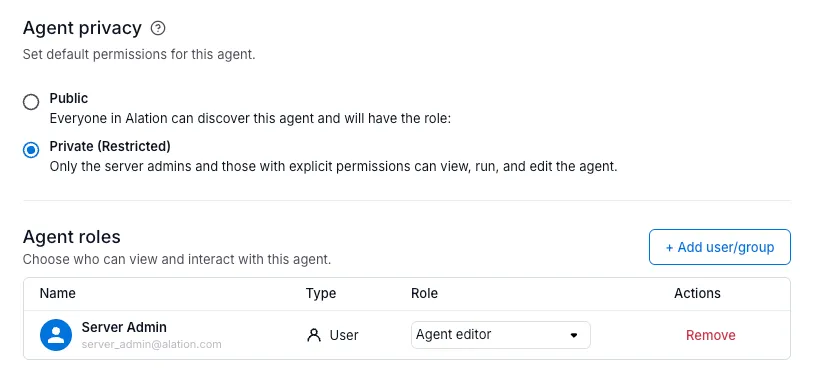
Choose Public or Private in the Agent privacy section.
- Public — everyone in the tenant gets the role you pick (viewer or user).
- Private (Restricted) — only you and anyone granted a role below can reach the agent.
-
Grant specific users or groups a role, independent of the public/private setting, in the Agent roles section — viewer, user, or editor.
Who can manage an agent’s access: its owner, anyone granted editor, and Server Admin. Default agents (built-in system agents) are always public and can’t be restricted.
Finding agents by privacy
Section titled “Finding agents by privacy”When browsing agents, filter by Public or Private to see which agents fall into each bucket.

Listing in the marketplace (separate from access)
Section titled “Listing in the marketplace (separate from access)”The List in marketplace / Unlist from marketplace button controls discoverability, not access. Listing an agent doesn’t grant anyone a role on it, and unlisting doesn’t revoke one.
Related
Section titled “Related”- Agent access settings — the full role model.
- Publish an agent to MCP — expose the agent as a tool for MCP clients and other agents.