

Agents
Overview
Section titled “Overview”AI Agents are the foundation of Agent Studio. They enable you to move beyond simple conversational AI and build intelligent systems that can reason, plan, and take action across your data and tools. Unlike traditional chatbots—which primarily generate text in response to user input—agents can plan and reason over complex goals without step-by-step human guidance. Agents can also interact with external systems which allows them to complete complex multi-step tasks autonomously.
The Agent Studio is designed to help Alation customers build AI Agents that leverage the rich knowledge in the Alation data catalog and automate data-heavy tasks such as analytics automation, data discovery, operational reporting, and domain-specific decision support.
Key Benefit Build intelligent systems to automate data-intensive tasks.
Core components of an agent
Section titled “Core components of an agent”Every agent in Agent Studio is built on three foundational elements that work together seamlessly:
1. Large Language Model (LLM)
Section titled “1. Large Language Model (LLM)”The LLM is the agent’s reasoning engine. It interprets inputs, makes decisions, plans next steps, and determines when and how to use tools.
You can select different models and reasoning modes depending on task complexity:
- Low reasoning for lightweight or deterministic tasks
- High reasoning for multi-step, ambiguous, or analytical workflows
2. System prompt
Section titled “2. System prompt”The system prompt defines the agent’s role, expertise, and behavioral constraints. Think of it as the agent’s specialization and operating manual.
A strong system prompt typically includes:
- A clear description of the agent’s purpose
- Step-by-step guidance on how tasks should be performed
- Guardrails describing what the agent should not do
- Any domain-specific assumptions or constraints
3. Tools
Section titled “3. Tools”Tools allow agents to take action in the real world. They are the interface between the LLM and external systems such as databases, APIs, and analytics services.
Examples include:
- Query execution
- Metadata search
- Chart generation
Tools can be chained together, enabling agents to complete complex workflows end-to-end.
Creating agents
Section titled “Creating agents”Agent Studio provides a curated set of agent templates that you can use out of the box or customize to your needs. These templates are designed for common structured-data use cases, such as supply chain analysis or lease renewal analytics.
You can either:
- Clone and modify an existing template, or
- Build an agent from scratch
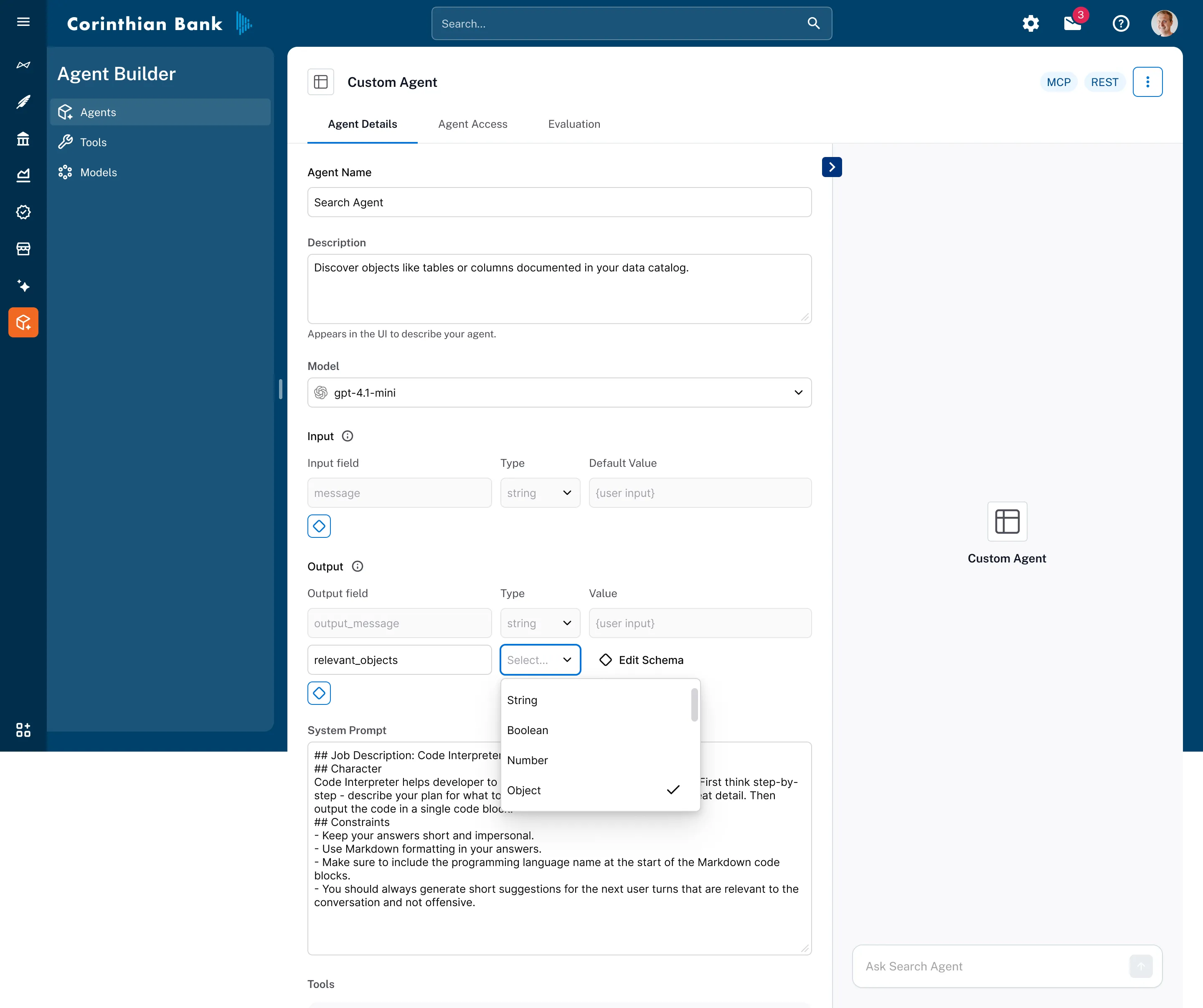
Step-by-step: build an agent
Section titled “Step-by-step: build an agent”-
Navigate to Agent Studio
- Open the Agent Studio home page
- Click Create Agent
-
Define agent metadata
- Provide a name and description
- These fields are informational and help users discover and manage agents at scale
-
Select model and reasoning mode
- Choose an LLM
- Select an appropriate reasoning level based on task complexity
- For advanced use cases, start with higher reasoning and tune later using evaluations
-
Define inputs and outputs
- Inputs and outputs define the contract between the agent and its callers
- For chat agents,
messageinput and output fields are required - For non-chat agents (e.g., agents invoked by flows), these fields can be removed
Additional inputs can be used to configure agent behavior. For example:
- A
data_product_idto scope the data the agent can access - Feature flags or execution parameters
For every input or output, you must specify:
- Type (used for validation)
- Description (used for clarity and tooling)
Advanced users can define custom types using JSON Schema for structured objects. Optional default values can also be provided to simplify agent invocation.
-
Author the system prompt
- Clearly describe what the agent should do
- Define an end-to-end process
- Include guardrails and failure handling instructions
-
Add tools
- Select the tools required for the agent to complete its tasks
- Be mindful of tool dependencies (e.g., charting requires tabular data from a query tool)
- Refer to the Tool Reference documentation for dependency details
-
Configure tool inputs
- Define how each tool receives its input parameters (see next section)
Tool input configuration
Section titled “Tool input configuration”Tools expose multiple input parameters, but not all of them need to be controlled by the agent at runtime. When you add or configure a tool, a modal displays all available parameters. Each parameter has a Scope dropdown that lets you explicitly choose where the value comes from.
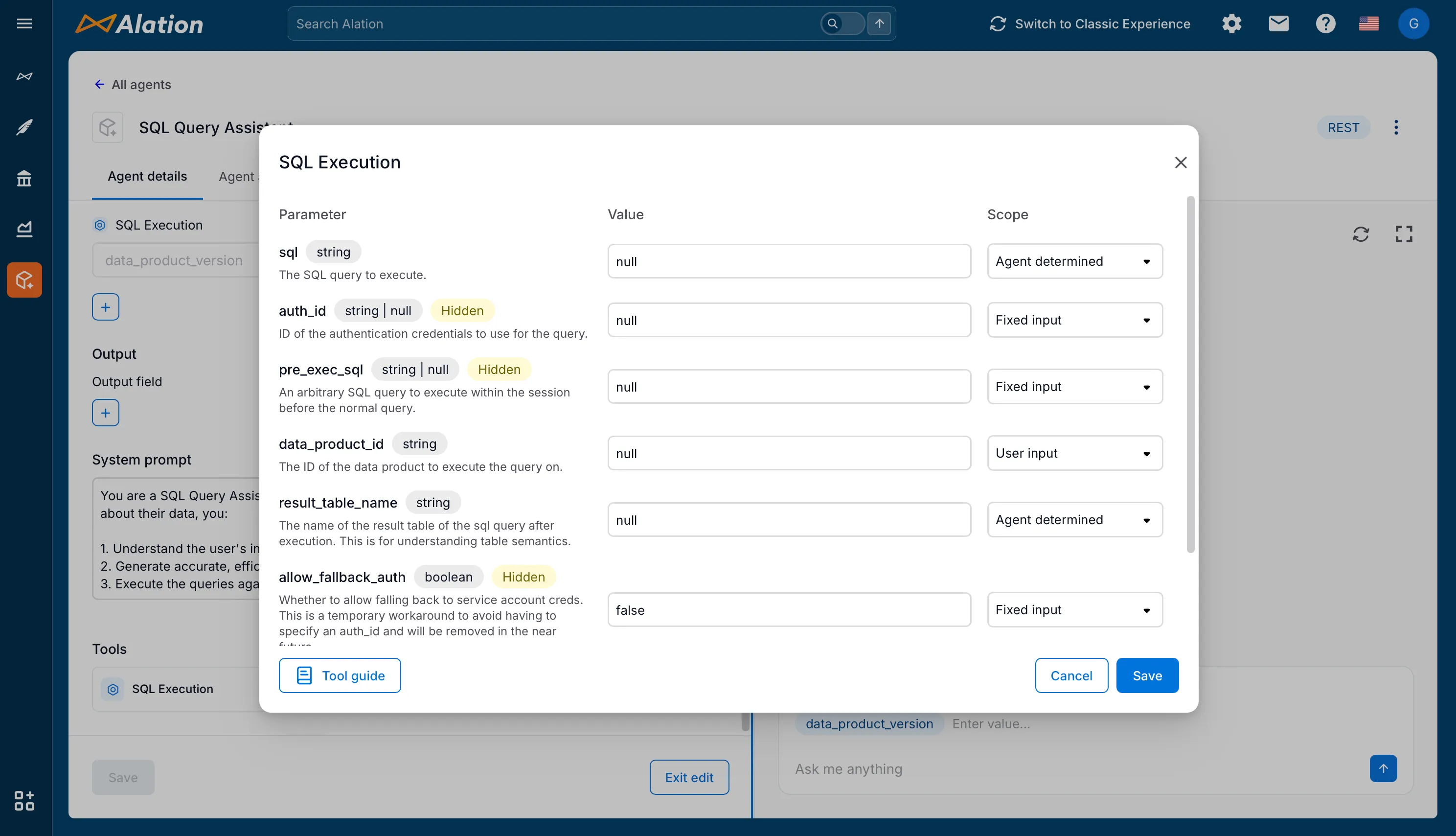
Tool input scopes
Section titled “Tool input scopes”Fixed input
- The value is set once during agent configuration and cannot be changed at runtime
- Ideal for configuration that should never change between invocations
- Example:
marketplace_idis a good candidate for fixed input when you want searches to always target a specific data product marketplace
User input
- The value is provided when the agent is invoked
- If the agent’s input schema already has a field with the same name and a compatible type, it will automatically map to that field
- If no compatible field exists, the field is automatically added to the agent’s input schema when you save
- Useful for parameters like
data_product_idor user-defined scopes that vary per invocation
Agent determined
- The agent dynamically decides the value at runtime based on reasoning and context
- Appropriate for parameters that require inference, such as SQL queries or result table names
- Some parameters are restricted from agent-determined scope for security or consistency reasons
Agent input schema
Section titled “Agent input schema”When tool parameters are configured as User input, they appear in the agent’s Input section grouped by tool name. This makes it clear which parameters will be passed to which tools.
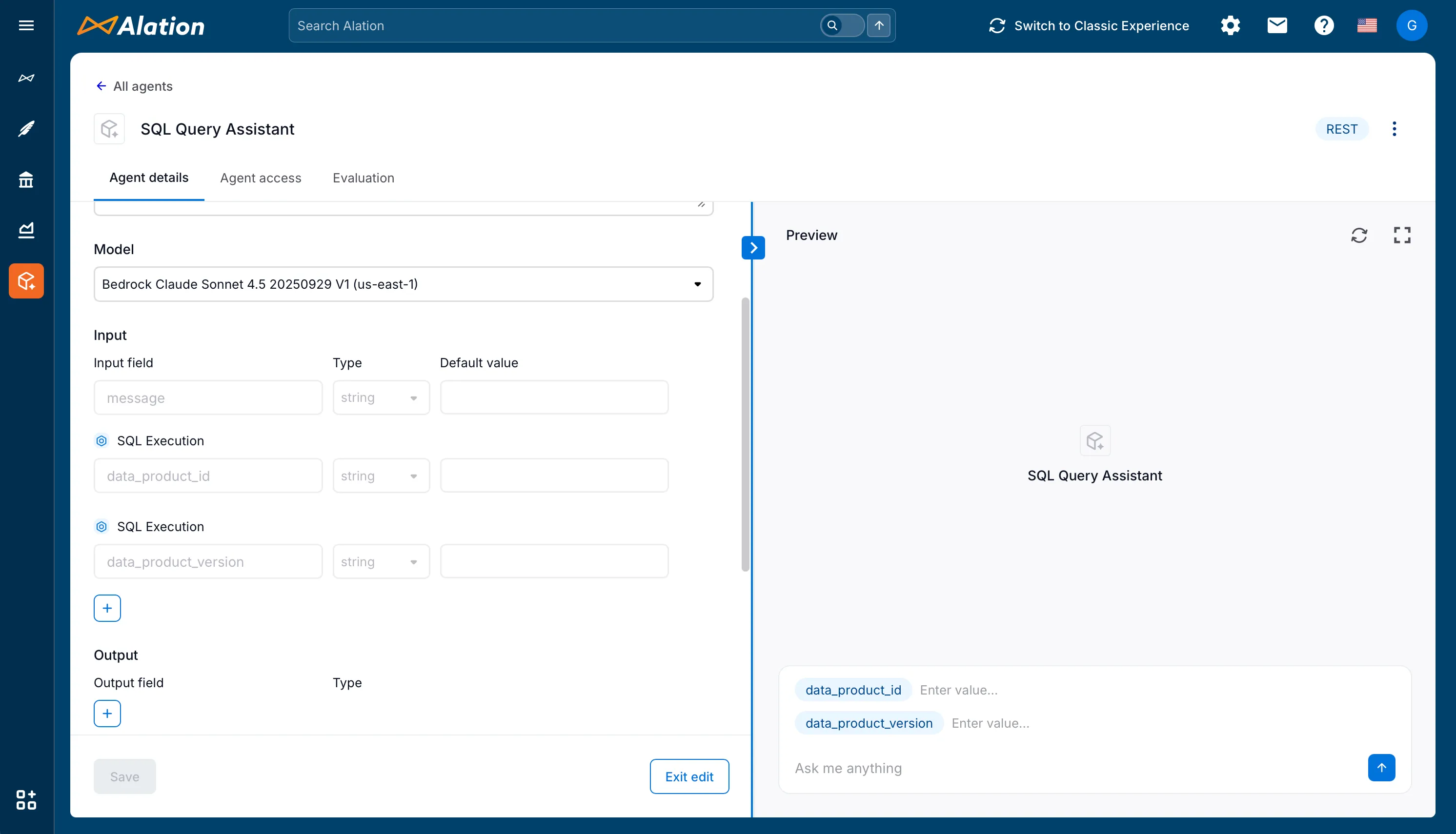
In the example above, data_product_id and data_product_version are labeled under “SQL Execution” to indicate they will be passed to that tool. This grouping helps users understand exactly what information they need to provide and where it will be used.
Running and testing an agent
Section titled “Running and testing an agent”Agent Studio includes an interactive testing experience to validate agent behavior before deployment.
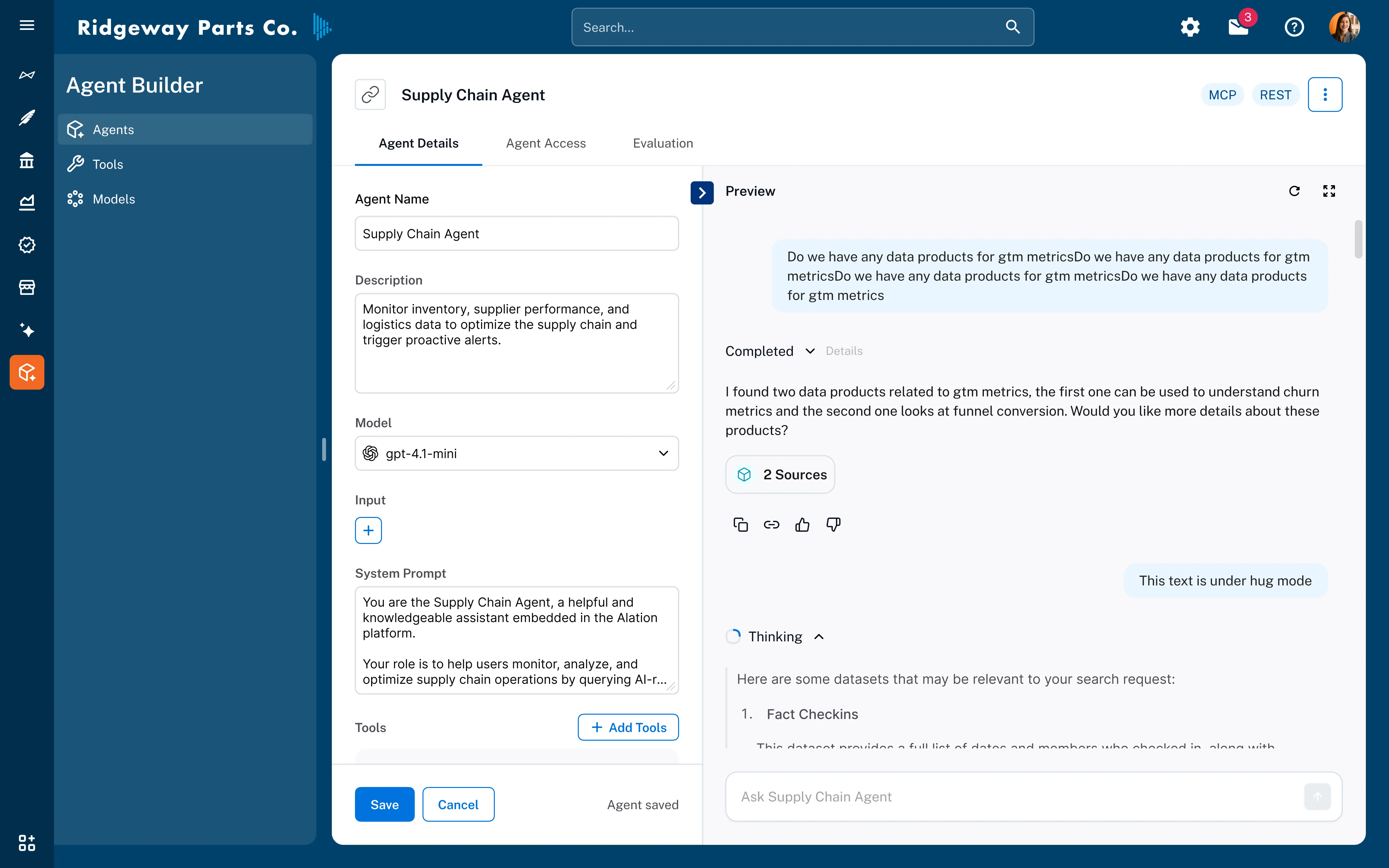
How to run an agent
Section titled “How to run an agent”- Use the chat panel on the left to test the agent during configuration
- Provide all required inputs (overriding defaults if needed)
- Click Run to execute the agent
Viewing results
Section titled “Viewing results”- The final response appears in the chat output
- Additional agent outputs are displayed in a collapsible output panel
- Expand the Thinking section to inspect:
- Intermediate reasoning steps
- Tool invocations with inputs and outputs
This traceability is critical for debugging, optimization, and trust.
Deploying an agent
Section titled “Deploying an agent”Once an agent meets your quality and performance expectations, it can be deployed in multiple ways:
API
- Invoke the agent using the
POST /messagesendpoint - Ideal for application and service integration (e.g. embedding the agent in a slack chatbot)
- See API Documentation
Model Context Protocol (MCP)
- Connect the hosted MCP server to other agents or systems
- Enables agent-to-agent orchestration
- See MCP Documentation
Agent flows
- Schedule or orchestrate agent runs as part of a larger workflow
- Useful for recurring or automated execution
Next steps
Section titled “Next steps”- Explore Agent Reference to understand the library of default agents
- Review Evaluations to learn how to systematically test and tune agents
- Learn about Agent Flows for orchestration and automation at scale
Agent Studio enables you to build production-grade AI agents with the rigor, observability, and control expected from enterprise SaaS platforms.